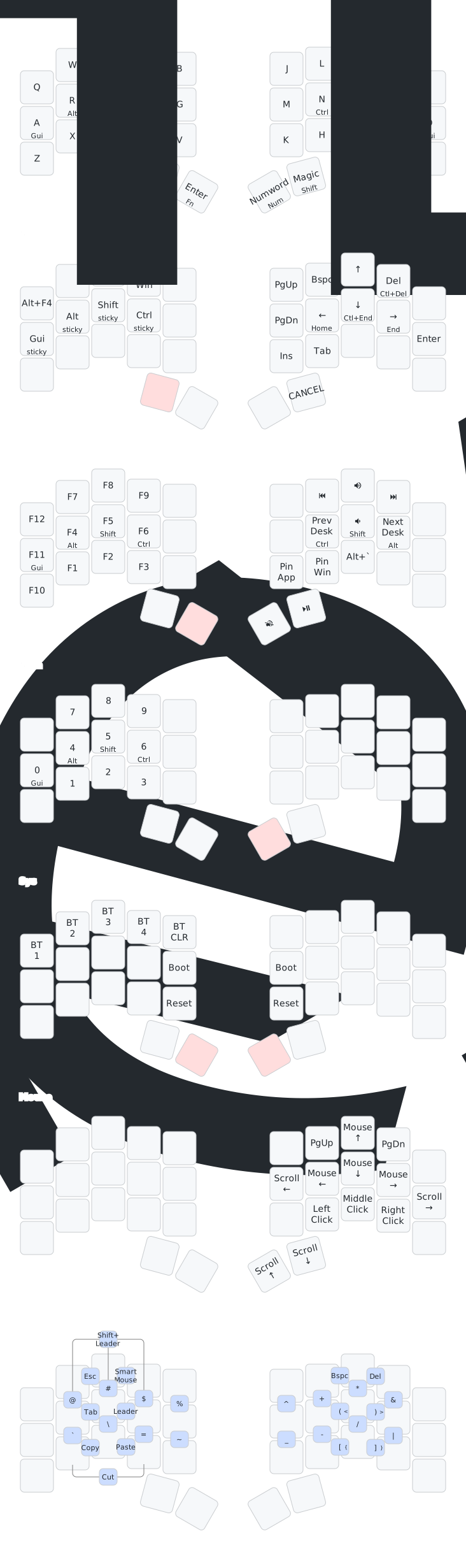
ZMK Layout Compare
Callum (QMK, Colemak, 34-key) · urob (ZMK, Colemak-DH, 34-key) · Ours (ZMK, QWERTY, 34-key)
Base Layer
CALLUM
Colemak · no homerow mods · dedicated LSFT thumb
UROB
Colemak-DH · timeless homerow mods · smart behaviors
AGUI
RALT
SSFT
TCTL
G
M
NCTL
ESFT
IALT
OGUI
SPCNAV
FNRET
NUMsmart
SFTmagic
OURS
QWERTY · GACS homerow mods (Miryoku) · ESC = combo W+E
AGUI
SALT
DCTL
FSFT
G
H
JSFT
KCTL
LALT
'GUI
SPCNAV·ESC
TABESC
ENTSYM
BSPCNUM
Callum: Clean base, no mods anywhere. Dedicated shift thumb. NAV/SYM hold-only (no tap output).
urob: Homerow mod-tap with positional constraints (left mods fire only with right keys). Smart-num auto-toggles. Magic-shift = tap-repeat + sticky-shift + caps-word in one key. Shifted punctuation (comma→semicolon etc).
Ours: Clean base like Callum. Layer-tap thumbs like Miryoku (SPC=NAV, ENT=SYM, BSPC=NUM). ESC via left thumb combo. TAB is plain for now.
NAV Layer
CALLUM
macOS nav · swapper · media mixed in
TAB
SW_W
TAB←
TAB→
VOL+
RST
HOME
↑
END
DEL
SFT
CTL
ALT
CMD
VOL-
CAPS
←
↓
→
BSPC
SPC←
SPC→
BACK
FWD
PLAY
·
PGDN
PGUP
SWLG
ENT
UROB
clipboard top · arrows right · swapper · mods left
ALT F4
·
S-TAB
SWAP
·
PGUP
C-BSP
↑
C-DEL
·
OURS
hold SPC · callum left + Miryoku nav right · oneshot GACS
TAB
SWAP
TAB←
TAB→
VOL+
·
·
·
·
·
GUI
ALT
CTL
SFT
VOL-
←
↓
↑
→
CAPS
DSK←
DSK→
BACK
FWD
PLAY
·
·
·
·
·
Callum: macOS-centric (cmd-arrows, desktop switching). Swapper (SW_WIN) for alt-tab. Media keys mixed into NAV. Oneshot SCAG order.
urob: Swapper on top row. Ctrl-backspace/delete (word delete). Homerow oneshot mods on left (GACS). Cancel key on right thumb.
Ours: Callum's left side (swapper, tab-switch, desktop-switch, vol, media) + Miryoku right side (arrows, home/end, clipboard). Oneshot GACS on left homerow (hold = normal mod for repeat actions like word-delete). Windows shortcuts: DSK = Win+arrows, TAB←/→ = Ctrl+Shift+Tab / Ctrl+Tab, SWAP = Alt+Tab via tri-state.
SYM Layer
CALLUM
symbols both hands · ESC top-left · oneshot mods right
UROB
no SYM layer — all symbols via combos on base (from keymap-drawer)
scroll to bottom for Combos layer
OURS
hold ENT · Miryoku symbols left · oneshot SCAG right
Callum: Symbols on both hands — paired brackets across split. ESC at top-left. Oneshot mods on right homerow.
urob: No SYM layer at all! All symbols via vertical combos on base layer (press two vertically adjacent keys). Top row = shifted numbers, middle = brackets, bottom = operators. Always available without holding a layer key.
Ours: Miryoku-style all symbols on left. Right side = oneshot mods (SCAG). Right side is mostly empty — room for expansion. Missing: ( ) were on thumbs before, now gone — could add as combos or somewhere on the layer.
NUM Layer
CALLUM
tri-layer (NAV+SYM) · numbers + F-keys + mods
SFT
CTL
ALT
CMD
F11
F10
CMD
ALT
CTL
SFT
UROB
smart-num (auto-toggle) · numpad left · mods right
OURS
hold BSPC · Miryoku numpad left · BT/system right
Callum: Tri-layer (hold both thumbs). Dvorak-scattered numbers. F-keys embedded. Oneshot mods on both homerows.
urob: Smart-num auto-toggles — tap to enter num mode, auto-exits after non-number. Numpad layout (7-8-9 / 4-5-6 / 1-2-3). Homerow mods on 0-4-5-6. Very clean.
Ours: Single thumb hold (BSPC). Miryoku numpad with extra symbols (brackets, operators). BT/system on right — should probably move to a separate system layer (see discussion). 0 and punctuation on bottom-right.
Our Combo Layer (optional — try alongside SYM layer)
urob's pattern on QWERTY: shifted num row vertical top+mid, operators vertical mid+bot. ESC/TAB horizontal off pinky.
OUR COMBOS ON QWERTY
SPC/NAV
TAB
ENT/SYM
BSP/NUM
Blue = vertical combos (press top+bottom key in same column)
Purple = horizontal combos (press adjacent keys on same row)
ESC (W+E), TAB (S+D), CUT (Z+X), COPY (X+C), PASTE (C+V)
Optional. SYM layer still works. Combos are for quick access without holding a thumb.
Philosophy comparison
Modifiers
Callum: oneshot on layers, no timers, no ambiguity, 2-step for mods
urob: homerow mod-tap with positional + idle guards, 1-step mods, timing-dependent
Ours: oneshot on layers (callum-style), GACS order (Miryoku muscle memory)
Symbols
Callum: dedicated SYM layer, both hands
urob: vertical combos on base — no layer needed, always available
Ours: dedicated SYM layer (Miryoku) + optional combos on base (urob-style)
Numbers
Callum: tri-layer (awkward), scattered layout
urob: smart-num auto-toggle (tap once, type numbers, auto-exit)
Ours: single thumb hold (comfortable), numpad layout
ESC
Callum: on SYM layer top-left
urob: combo W+E (horizontal, off pinky)
Ours: combo W+E (same as urob) + combo SPC+TAB (thumbs)
Swapper (alt-tab)
Callum: custom QMK behavior, on NAV
urob: tri-state ZMK module, on NAV
Ours: TODO — add via zmk-tri-state module
Thumb Overlay — Miryoku 6 vs Ours 4
Grey = Miryoku's 6 thumbs (chocofi). Bold outline = our 4 thumbs (sweep). Dim = keys we lost going to 4 thumbs. Where did they go?
BASE
ESCMEDIA
SPCNAV
TABMOUSE
ENTSYM
BSPCNUM
DELFUN
Lost: ESC/MEDIA, TAB/MOUSE, DEL/FUN → ESC=combo W+E, TAB=plain thumb, DEL=on NAV, MEDIA/MOUSE/FUN=TBD
NAV (hold SPC)
All thumbs passthrough on NAV. Lost: DEL (introduce later). RET/BSPC still reachable via base passthrough.
SYM (hold ENT)
Miryoku: ( ) _ on left. Ours: ) on SPC, _ on TAB. ( recovered via SPC+TAB combo on SYM layer.
NUM (hold BSPC)
Miryoku: . 0 - on left. Ours: 0 on SPC, - on TAB. . recovered via SPC+TAB combo on NUM layer.
MEDIA / MOUSE / FUN — not mapped yet
These 3 layers lost their thumb access. Options: combos, conditional layers, tap-dance, or keys within existing layers.